If you are a Haryana government employee and you still visit your department office every month just to collect your salary slip or check your GPF balance, then this article is going to save you a lot of time. The Intra Haryana HRMS Portal puts every HR-related service directly on your phone or computer screen — available 24 hours a day, 7 days a week, without any office visit required.
In this complete 2026 guide, we will walk you through everything — from logging in for the first time to downloading your salary slip, applying for leave, checking your GPF balance, and filing your annual property return — all in simple, easy-to-follow steps.
Intra Haryana HRMS Login 2026 – Step by Step Guide
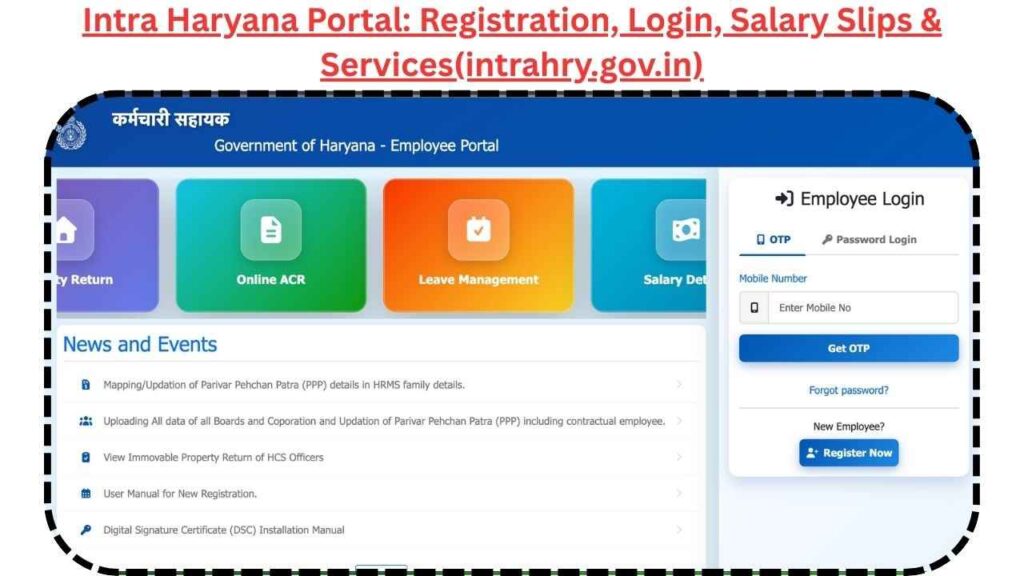
The portal gives you two different ways to login so you can choose whichever is more convenient for you. Before you begin, keep the following things ready:
- Your Employee ID or Payee Code (issued by your department)
- Your registered mobile number (for OTP login)
- Your HRMS password (for password login)
Always open the portal by typing the URL directly in your browser: https://intrahry.gov.in
Security Warning: Never login through links sent via WhatsApp, SMS, or email. Always type the official URL manually to avoid fake websites.
Option A: Login Using OTP (Recommended)
This method is best when you have your registered mobile phone with you and want a quick, password-free login.
Step 1: Open your browser and go to https://intrahry.gov.in
Step 2: On the login screen, you will see two options. Select “OTP Login.”
Step 3: Enter your registered mobile number in the field provided and click the “Get OTP” button.
Step 4: Within a few seconds, a One-Time Password (OTP) will arrive on your phone via SMS. Enter this OTP in the verification box on the screen.
Step 5: Type the CAPTCHA code shown in the image box carefully and click Submit. Your personal HRMS dashboard will open immediately.
Option B: Login Using Password
This method is faster if you have your password memorized and do not want to wait for an OTP every time.
Step 1: Go to https://intrahry.gov.in and open the login page.
Step 2: From the two login options, select “Password Login.”
Step 3: Enter your Employee ID in the first field and your Password in the second field.
Step 4: Type the security code shown in the CAPTCHA box accurately.
Step 5: Click Submit. You will be taken directly to your personalized dashboard.
Important 2026 Tip: If your account gets locked after several incorrect password attempts, wait 30 minutes and it will automatically unlock. For urgent help, call the official helpdesk at 0172-2927072.
How to Register on Intra Haryana Portal for the First Time?
If you are a newly appointed government employee and have not yet registered on the portal, you need to complete a one-time registration before you can login.
What you need:
- Your Payee Code or Employee ID (issued by your department)
- Your department-registered mobile number
Steps:
- Visit https://intrahry.gov.in and click on “New Employee Register” on the login page.
- Enter your Payee Code or Employee ID in the required field.
- Enter your registered mobile number.
- Verify your identity through the OTP sent to your mobile.
- Set a strong password for future logins.
- Your account is now active and ready to use.
Once registration is complete, you can login anytime using either the OTP method or your password.
How to Download Intra Haryana Salary Slip in 2026?
Downloading your monthly salary slip from the Intra Haryana portal is a simple process that takes less than two minutes.
Step 1: Login to your account at https://intrahry.gov.in using either the OTP or password method.
Step 2: On your HRMS dashboard, look for “e-Salary Slip” or “Salary” in the menu. It is usually found under the Employee Services section.
Step 3: Click on it to open the payslip module.
Step 4: A dropdown menu will appear. Select the month and year for which you need the salary slip.
Step 5: Click the “View” or “Download” button. The system will generate your salary slip as a PDF within seconds.
Step 6: The salary slip will either open in a new browser tab or download directly to your device. Save it for your records or print it as needed.
Why is Your Intra Haryana Salary Slip an Important Document?
Many employees only download their salary slip when they urgently need it. However, your monthly salary slip is actually a very important legal document that you should store carefully every month. Here is why:
- Bank Loan Applications — Required for home loans, personal loans, and car loans. Banks use it to verify your income and employment.
- Visa Applications — Embassies and consulates accept it as official proof of employment and monthly income.
- Income Tax Return (ITR) Filing — The detailed breakdown of salary, allowances, and deductions in your slip supports accurate ITR filing.
- Financial and Retirement Records — Useful for PF-related calculations and any salary verification required by your department.
Best Practice: Make it a habit to download and save your salary slip every month, even when you do not immediately need it. This creates a complete personal financial record that can be very helpful in the future.
How to Download Annual Salary Statement on Intra Haryana?
Along with monthly salary slips, the portal also provides an Annual Salary Statement — a single document that summarizes your total salary, allowances, and deductions across an entire financial year.
To download it, go to the e-Salary Slip section on your dashboard and look for the Annual Statement or Yearly Summary option. Select the financial year and download the PDF.
This document is especially useful during the ITR filing season and for any department-level salary verification or audit requirements.
How to Check GPF Balance on Intra Haryana Portal?
Keeping track of your General Provident Fund is easy through the HRMS portal.
Steps to Check GPF Balance:
- Login to https://intrahry.gov.in
- On your dashboard, find and click on “GPF Account Services”
- Your current GPF balance and complete transaction history will appear on the screen
- You can also download your GPF Statement as a PDF directly from this section
This gives you complete visibility over your retirement savings without needing to contact your department.
How to Apply for Leave on Intra Haryana Portal?
Gone are the days of submitting handwritten leave applications. The Intra Haryana portal allows you to apply for any type of leave online and track its status in real time.
Types of Leave You Can Apply For:
- Casual Leave
- Earned Leave
- Medical Leave
- Any other approved leave type
Step by Step Process:
Step 1: Login to your HRMS account at https://intrahry.gov.in
Step 2: Go to the “Online Leaves and Tour Module” from your dashboard.
Step 3: Click on “Apply for Leave.”
Step 4: Fill in the required details — select the leave type, enter the start date and end date, and mention the reason for leave.
Step 5: Click Submit. Your reporting authority receives the application instantly online.
Step 6: Track the approval status in real time from the same module — no need to follow up personally.
How to File Annual Property Return on Intra Haryana?
Every Haryana government employee is required to file an Annual Property Return before the mandatory deadline of April 30th each year. The Intra Haryana portal makes this process completely digital.
What You Need to Declare:
- Immovable assets (land, property, house)
- Movable property (vehicles, jewelry, investments)
- Outstanding liabilities (loans, dues)
Steps:
- Login to the portal and go to the “Property Return” section
- The portal guides you through the form step by step
- Fill in all required details accurately
- Review and submit before the April 30th deadline
- Download the submission confirmation for your records
Filing the property return on time is mandatory. Late submissions can result in departmental action.
Intra Haryana Portal Helpdesk and Contact Details 2026
If you face any issue with the portal and need direct assistance, here are the official support channels:
| Contact Method | Details |
|---|---|
| Helpdesk Phone | 0172-2927072 |
| Email Address | treasuries@hry.nic.in |
| Office Location | 2nd Floor, 30 Bays Building, Sector-17, Chandigarh |
| Official Portal | https://intrahry.gov.in |
The helpdesk is available during government working hours on all working days. For technical issues like account lockout or login problems, a phone call to the helpdesk is the fastest way to get help.
Frequently Asked Questions (FAQs)
Q1. What is the official website of the Intra Haryana HRMS portal? The only official and authentic website is https://intrahry.gov.in. Never login through any other link or third-party website. Always type the URL directly into your browser for safety.
Q2. Is registration mandatory before the first login? Yes. New employees must complete a one-time registration using their Payee Code or Employee ID and their department-registered mobile number before they can login for the first time.
Q3. Can I download salary slips from previous years? Absolutely. The portal maintains a complete archive of all past salary slips. Simply go to the e-Salary Slip section, select any previous month and year from the dropdown, and download the PDF exactly as you would for the current month.
Q4. Is the salary slip from Intra Haryana accepted by banks? Yes. The salary slip downloaded from intrahry.gov.in is digitally signed and officially recognized. It is widely accepted by banks and financial institutions across India for loan applications, credit card applications, and other financial purposes.
Q5. Can I use the Intra Haryana portal on my smartphone? Yes. The portal is fully accessible through any standard mobile browser. Open your browser, visit the official URL, and login the usual way. No app download is required.
Q6. What should I do if I forget my HRMS password? On the login page, click the “Forgot Password” option. Enter your Employee ID and registered mobile number. An OTP will be sent to your phone to verify your identity. You can then set a new password and login immediately.
Q7. How can I update my bank account information on the portal? Login and go to your Profile section. While basic personal details can be edited by you directly, changes to financial information such as bank account numbers require verification and DDO approval before they take effect in the system.
Q8. How long does it take for leave approval on the portal? Once you submit a leave application online, your reporting authority receives it instantly. Approval time depends on the authority, but the digital process is significantly faster than paper-based applications. You can track the real-time status from your dashboard at any time.